



Winbeatz Login
Winbeatz login brings you back to your account through a simple sign-in window with the essentials in one place. The Win Beatz login window keeps sign-in quick and shows recovery options in the same place. You enter, check the basics, and continue your session under the same account you already use on the platform.


Winbeatz Registration
Registration creates your Winbeatz account for sign-in and account management. You start with email and password, then add your basic details so your profile stays complete for support and verification when needed.
What registration at Win Beatz gives you:
- One account for sign-in, account security, and profile management
- A personal area where you can review your details and keep them up to date
- Access to offers that require an account, including promo code entry during sign-up when you have a code
- A clearer support flow, because your requests link to the account you use to play
How to Set Up Your Account
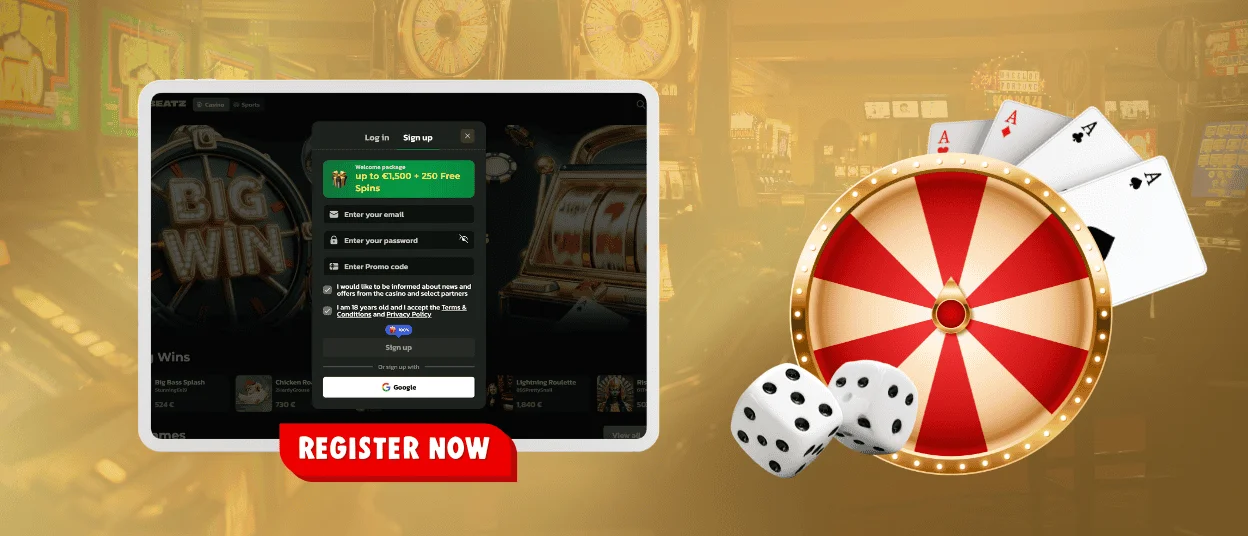
Registration runs in two screens, and each step asks for a specific set of details.
- Open the Sign up tab in the login window.
- Enter your email address.
- Create a password.
- If you have a promo code, enter it in the promo code field.
- Choose whether you want to receive news and offers from the casino and selected partners.
- Confirm you are 18 years old and accept the Terms and Conditions and the Privacy Policy.
- Click Sign Up.
- In the second screen, enter your first name, last name, date of birth, and phone number, then click Save.
You can also choose Sign up with Google. This option reduces manual typing, and you can still review your profile details after you enter your account.
Winbeatz Login and Account Management
Open Log in, enter your email and password, and click Login. You can use the eye icon to check the password before you continue. If you used Google during registration, use the Google option again at login so you enter the same account.
After sign-in, your Win Beatz account area acts as a practical hub. We keep the key actions close, because players usually want to make quick checks between sessions rather than dig through settings. You can review your Winbeatz profile, confirm account readiness for cashier actions, and keep security details current.
Inside your Win Beatz account, you can:
- Review and update profile details such as contact information
- Check account status and follow prompts related to security and verification
- Track bonus and promotion progress when your account shows an active offer
- Update security basics, including changing your password when you need to
If you see a promotion message on the Sign up screen, use it only as a starting point. Confirm the full terms in the promotion details before you activate any offer.
Quick fixes for login and access
Check the email and password you entered. If you registered with Google, sign in with Google on the same screen. The table below outlines the next steps.
| Situation | What you may see | What usually fixes it |
| Wrong email or password | Login does not go through | Re-check spelling, confirm the correct email, use the password visibility icon, then try again |
| Saved password mismatch | The form fills a password that fails | Clear the saved entry, type the current password once, then sign in again |
| Incomplete registration | You cannot access the account after signing up | Return to Sign up and finish the second screen, then log in with the same email |
| Google sign-in confusion | You sign in with a different Google account | Switch to the correct Google profile in your browser, then try again |
Forgot Your Password?
Use Forgot password and enter your account email. The reset email includes a link where you can create a new password.
No email yet: check spam and promotions and confirm the address. Login still fails after reset: update or remove saved passwords for this site and enter the new password manually.
For further help, contact support via live chat or email and share the account email.
Verification at Winbeatz Casino
Verification confirms that the account belongs to the person who created it and helps us process withdrawal and other payment-related requests. Use documents that match your profile details and upload clear photos of the full document. The image should show all edges, with readable text and no glare.
If you spot a difference between your profile and the document, update the profile first. If a field is locked, contact support so we can correct the detail before you submit verification.
FAQ
I cannot find the password reset email.
The reset message may land in Spam, Junk, or Promotions. A quick mailbox search for Winbeatz also helps.
I changed the password, but login still fails.
An old saved password may still fill the field. Remove the saved Winbeatz password in your browser or password manager, then type the new one manually. Also confirm you are using the same email you requested the reset for.
I registered with Google. How do I sign in?
Accounts created with Google use Google sign-in. Choose Continue with Google and select the same Google account you used during registration. Email and password sign-in works only for accounts registered by email.
Is it safe to stay signed in?
On a private device, it is fine for convenience. On a shared device, sign out after the session and avoid saving passwords.
Need help with access?
Support is available via live chat and email. Share the Winbeatz account email and describe what happens on your screen.


